Sender IDs
Important SMS Sender ID Update
From 1 July 2026, all alphanumeric sender IDs (e.g. ‘MyBrand’) used in SMS to Australian numbers must be registered under a new ACMA Sender ID Register. Unregistered sender IDs will be labelled “Unverified” and may be blocked — impacting message delivery and customer trust. What you should do now:
- If you are registered on the Australian Business Register, ensure your ABN and contact details are up to date
- Apply to register your Sender IDs following the steps below We’ll guide you through the process — more info coming soon. Learn more - https://www.acma.gov.au/sms-sender-id-register
What is a Sender ID?
A Sender ID is an 11 character alphanumeric string that is placed over the top of the Mobile Number. Using a Sender ID will mean that the traffic is 1-way only. A Sender ID is typically a company name or a service that the company provides and is a way for your recipients to easily distinguish your company as the originator of the SMS. Sender IDs may also be referred to as:
- Alphanumeric Mask / Alphanumeric Sender ID
- Alpha Mask
- Source Mask
- Spoofing
Sender ID Rules
- A Sender ID has a maximum of 11 characters including spaces.
- It can include a combination of letters and numbers
- A Sender ID can include spaces and underscores, but not before or after. I.E My_Cmpny will work, MyCmpny_ or _MyCmpny won’t work.
- A Sender ID can not contain Symbols, full stops, or any other special characters (it can contain hyphens).
- A Mobile Number can not be used as a Sender ID.
What are the benefits of using a Sender ID?
There are a number of reasons why a company may use a Sender ID.
- By using a Sender ID, customers will immediately recognise who the SMS text message is from, making them more likely to read the message
- To distinguish between different services a company provides, i.e MyCmpnyTS , or CompanyBill .
- To block the ability to reply to a message.
Applying for a Sender ID
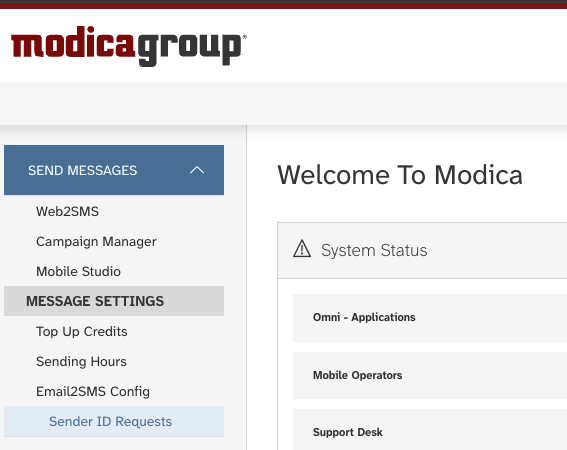
To request a Sender ID, navigate to “Sender ID Requests” and complete the form to submit your request. If you do not see this option available, please raise a support request.
Before a Sender ID can be used by in Australia, it needs to be registered and approved by the network as well as ACMA.
To register a Sender ID for your company, simply select “Sender ID Requests” in the navigation menu. If you do not see this option available, please raise a support request.
Select the Country you are registering the Sender ID for. Also select the Request Type:
- The request type is “Business” if you are registering a Sender ID on behalf of your own organisation
- The request type is “Associate” if you are registering a Sender ID on behalf of another organisation, who you send SMS on behalf of
Provide information for the organisation you are registering the Sender ID for:
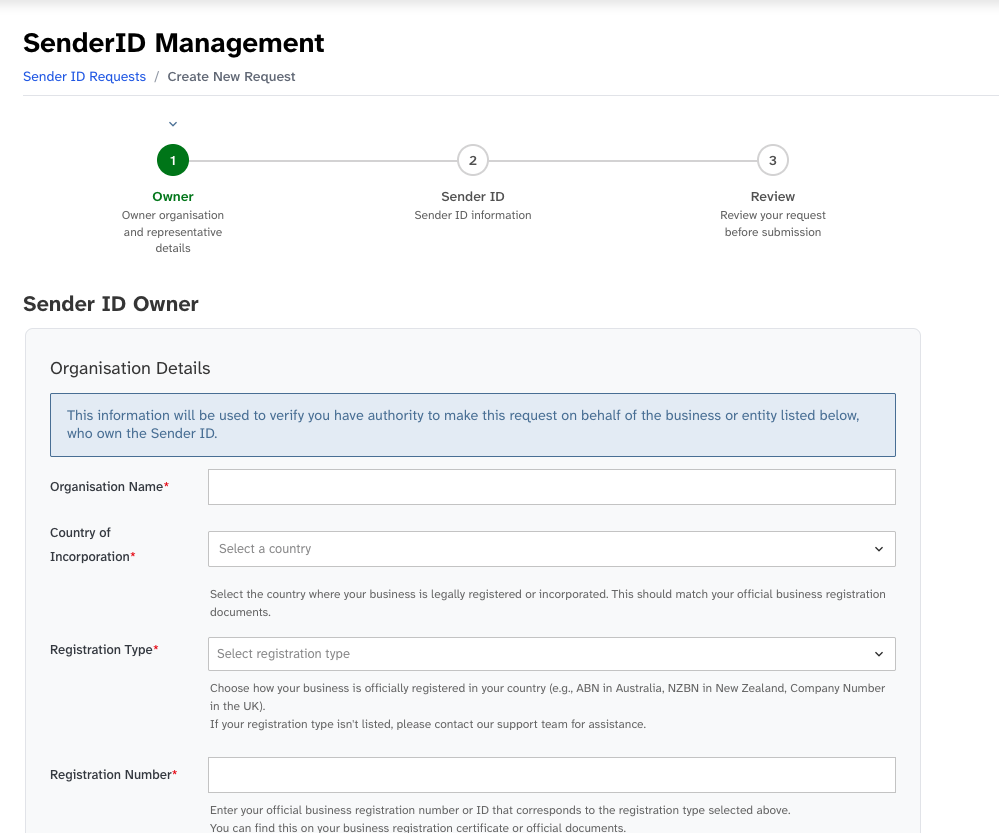
Please note, depending on your agreement with Modica, you may be charged for a Sender ID registration. Any applicable costs will be shown on the review page before you submit the request. Only authorised users will be able to submit these requests, if you are not an authorised user, you will be referred to one by a member of our team.
ACMA Justification List
To register a sender ID, it must be clearly linked to your organisation. This helps consumers recognise who the message is from and reduces the risk of confusion or impersonation. A sender ID is considered a valid match if it:
- Is the same as your organisation’s name, or a shortened version (e.g., ‘Australian Taxation Office’ → ‘ATO’) or
- Is an acronym or initialism of your name (e.g., ‘Australian Communications and Media Authority’ → ‘ACMA’) includes extra words that relate to your organisation’s role, location, or the purpose of the message (e.g., ‘ACMA Alerts’) or
- If it doesn’t meet these criteria, the sender ID cannot be registered.
If your Company will be sending messages on behalf of another company, please ensure that your Company has formal agreement to use the Names / trademarks / acronyms etc for this customer which services are provided.
FAQs
Compliance
What happens if i don't register my Sender ID?
From July 1 2026, all messages sent with an unregistered Sender ID will be blocked or overstamped with "Unverified" when sending within Australia, including both Australian and international Sender IDs.Do all my SMS messages require a Sender ID?
The use of Sender IDs in Australia is optional. Not all countries support the use of Sender IDs. Please check the requirements of your destination country prior to sending your message.What details do I need to provide to register a Sender ID in Australia?
For sending into Australia, you might be requried to provide: - Registed Name of the organisation who has the right to use the Sender ID - Organisations country of registration and registration number/identifier - Organisation Website, phone number and registered business address - Organisation Trademark details - Contact Information for an authorised person at the organisation including name, position, email and phone number. - Details about the Sender ID you wish to register, including the name and purpose. If you are doing a request on behalf of another organisation whose messages you send, you will be required to provide this info for your own organisation as well, if a letter of authorisation is required we will provide a template.Do we need to re-register with Modica if the Sender ID has already been registered with ACMA?
No, we believe you don't need to under the regulations, however we are confirming this understanding with ACMA.Will the Sender ID registered with Modica also be available through other Suppliers providing routes into Australia, or will we need to complete the same registration process with each Supplier?
Yes, we believe this is acceptable under the regulations, however we are confirming this understanding with ACMA.Can we manage our own registrations directly with the ACMA?
Yes, you can register to become a participating telco to register ABN customers, or as a certified telco to register non-ABN customers. There are a number of registration requirements to become a participating telco or a certified telco.Aggregators
How do I set myself up as a Telco Partner in the portal?
Once you have a Telco Partnership agreement in place, you can register yourself as a Telco Partner in our portal. If you are based in Australia, you may not need a Telco Partner agreement.
- Navigate to Sender ID Requests and select “Partner Details”. If you do not see this option, please raise a support request.
- Provide your partner details:
- Organisation Name
- Partner Type, which should be Telco Partner
- Contact information for a partner contact, including name and email
- Registration details for the country the organisation is registered in, including registration number and country of registration
- Website and business address for the organisation
What information do I need to provide to register Sender IDs on behalf of my customers?
-
Country for Sender ID use.
-
Request Type:
- If you are registering a Sender ID for one of your direct customers, for example registering “ABC” for your customer Avian Bird Community, select “Business”.
- If you are registering a Sender ID for a customer that sends SMS on behalf of another business, for example if a marketing company sends SMS on behalf of Avian Bird Community and wants to register “ABC”, select “Associate”.
-
Organisation Details - Sender ID Owner: Provide details for the organisation that owns the rights to the Sender ID:
- Organisation Name, as it appears on the official business registration
- Country of Incorporation
- Registration Type
- Registration Number
- Phone Number
- Website
- Registered Business Address
- Contact details for an authorised representative of the organisation, including Name, Position, Phone Number, and Email
Depending on the country of incorporation, additional or different information may be required. We will contact you if we need to collect anything further.
-
Associate Details: If you are completing this request on behalf of an organisation such as a marketing platform that sends SMS on behalf of the Sender ID Owner, you must also provide the same details for the associate organisation.
-
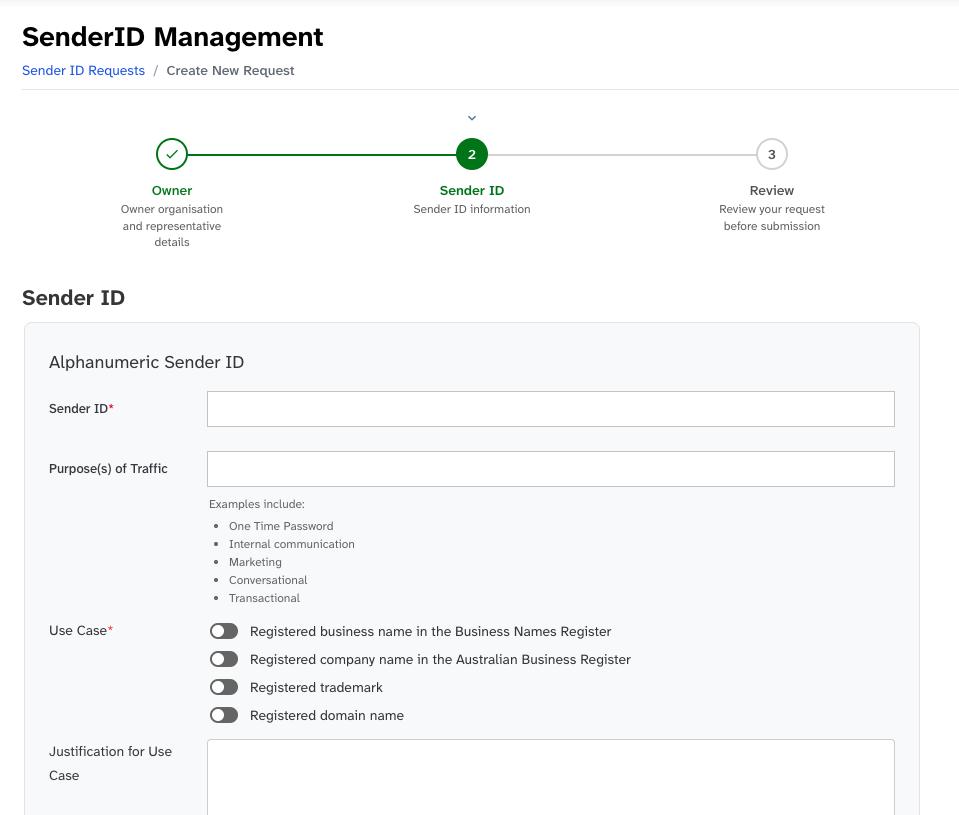
Sender ID Details:
- Sender ID
- Use Case. The Sender ID should match the business’s registered trademark, domain name, or name on the official business register.
Is there any registration required by Aggregators who are customers of Modica?
For sending into Australia, aggregators can become an International Partner of Modica which enables Modica to register Sender IDs on behalf of the Aggregators customers. Aggregators may also choose to register as a Participating Telco on the register via ACMA.Can aggregators register Sender IDs for direct as well of clients of aggregator partners?
The regulations only allow registration of sender IDs of your direct enterprise clients. We can still support the registration of non-direct enterprise clients by setting up an MSISDN for use with these customers instead. Please reach out to discuss a suitable solution.Applying for Sender IDs
Is there a cost to applying for Sender IDs?
For senders who do not have a registered Australian Business Number sending into Australia there will be a fee to cover the verification and operations costs of Modica.What is the lead time for getting a Sender ID registered?
As there will be a large number of registrations occuring prior to 1 July 2026, our recommendation is to register as soon as possible. Once the initial mass registrations are completed we will have a better idea of the the lead times for individual registrationsIs there a limit on how many Sender IDs that can be registered to a company?
**No**; there are no limits on Sender IDs registered against a single client. You can have as many Sender IDs as needed for your business purposes, as long as you can provide a valid ACMA justification or each new Sender ID.Can I register a Sender ID for a specific child account below my own, and not allow any other account to use it?
**Yes, absolutely**; we can register Sender IDs at different levels - - Parent level - Child level - Sender IDs can also be restricted to a specific application if required Please raise a support request if you wish to restrict use of a Sender ID registered on your account.Do my registered Sender ID's expire?
You can nominate an expiry date if your use case for the Sender ID is temporary, otherwise there is no enforced expiry date for Sender IDs.Delivery & Replies
After a Sender ID has been registered, how do I apply it to my messages?
**For API customers**, a customer can specify the Sender ID within the API call. For more information, please refer to the particular API user guide. **For customers logged into the SMS Portal**, simply select the required Sender ID from the list of Registered Sender IDs available in the dropdown list. Please note that this will only be visible to user accounts with the required permissions to access the Sender ID.How will Sender ID be displayed on handsets?
Devices display Sender ID differently: > **Q. On Apple?** > > **A.** Apple display Sender ID as one word, e.g. if the Sender ID is **ABC 123** , Apple devices drop the space and display **ABC123** (space has been removed). > **Q. On an Android?** > > **A.** Androids display Sender ID exactly as they are registered, e.g. if the SenderID is **ABC 123** , Android devices will display as **ABC 123.**Can I receive replies if I use a Sender ID?
**No**; the use of Sender IDs changes the traffic from 2-way to 1-way, meaning that you can send messages to your recipients but they are unable to reply. > **Q. But Apple devices seem to show that a reply message can be sent?** > > **A.** Apple devices may show that a reply message has been successfully sent, when in fact, the message won't have been delivered. This is due to the way iOS has been designed. Android devices will advise that "You can't reply to this message".What will happen to my message if it is submitted to a carrier that doesn't support Sender ID?
In most cases, the Sender ID will be removed and the message will be delivered from the number that has been activated on your application. However, depending on the rules / requirements in certain countries, the messages may be rejected. Some countries may also replace the Sender ID with another mobile number or short code.How do I know my messages have been blocked? What error will be sent back if a non-registered Sender ID is blocked?
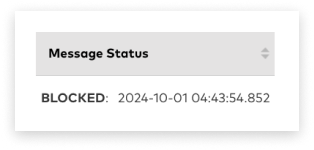
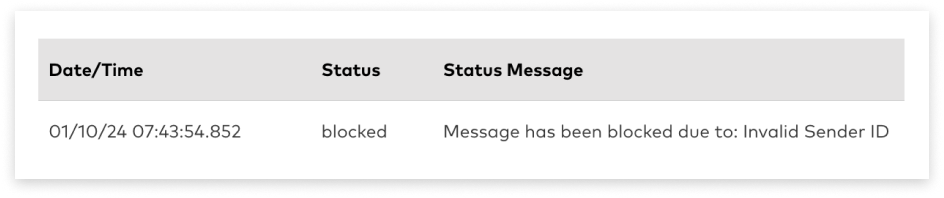
1. Log in to the SMS Suite and choose Mobile Report under Data & Insights on the side menu. The status for messages that have been sent with a non-regerested Sender ID will show as 'Blocke